

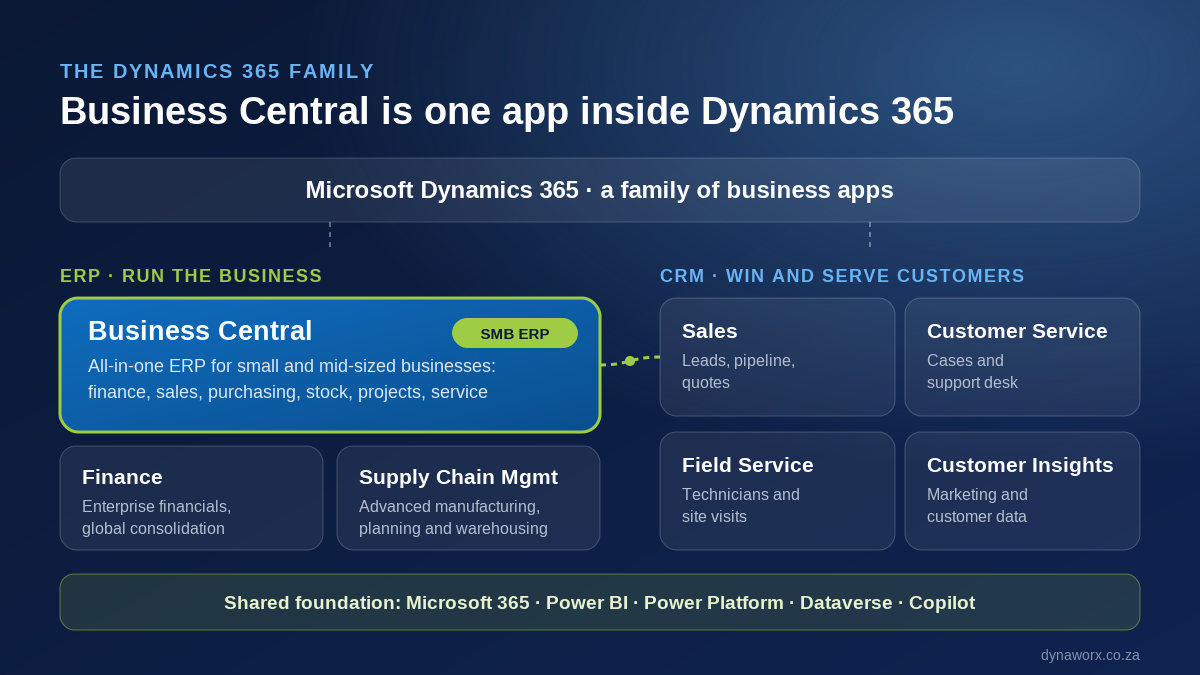
Short answer: Dynamics 365 is Microsoft's family of business apps for running operations (ERP) and managing customers (CRM). Business Central is one of those apps: the all-in-one ERP built for small and mid-sized businesses. So you don't choose between "Dynamics 365" and "Business Central". The real choices are Business Central or Dynamics 365 Finance and Supply Chain Management for your ERP, and whether to add a CRM app such as Dynamics 365 Sales.
Key takeaways
- Dynamics 365 is a family, not one product. You license only the apps you need.
- Business Central is Microsoft's ERP for small and mid-sized businesses, covering finance, sales, purchasing, stock, projects and service in one system.
- Finance and Supply Chain Management is the enterprise ERP for large or global groups with complex manufacturing and many entities.
- Dynamics 365 Sales is CRM, not ERP. It connects to Business Central rather than replacing it.
What is Dynamics 365?
Microsoft Dynamics 365 isn't a single piece of software. It's a family of cloud business applications that share one platform: Microsoft 365, Power BI, the Power Platform, Dataverse and Copilot. You pick the apps that match what your business does. They fall into two groups:
- ERP apps run the business: Business Central, Dynamics 365 Finance and Dynamics 365 Supply Chain Management.
- CRM apps win and serve customers: Dynamics 365 Sales, Customer Service, Field Service and Customer Insights.
As US partner Sikich puts it, leaving CRM aside, Dynamics 365 comprises two ERP systems: Finance and Supply Chain, and Business Central. That's where most of the confusion comes from. "Dynamics 365" appears in every product name, so it's easy to assume it's one big system.
What is Dynamics 365 Business Central?
Microsoft describes Business Central as "built and optimized for small and medium businesses", aimed at companies that have outgrown entry-level accounting software or older ERP systems. It brings finance, sales, purchasing, inventory, projects and service into one system, with manufacturing on the Premium licence.
Business Central is the successor to Dynamics NAV (Navision). It runs in Microsoft's cloud or on-premises, works inside Outlook, Excel and Teams, and online customers get Copilot included with their licence. For South African businesses moving off Sage, Pastel, QuickBooks or Xero, it's usually the natural next step. Read more on our Dynamics 365 Business Central page.
Business Central vs Dynamics 365 Finance and Supply Chain Management
This is the comparison that really matters when you're choosing an ERP. Both are Microsoft cloud ERPs on the same platform. The difference is scale and complexity. This summary draws on KPMG's comparison of the two:
| Area | Business Central | Finance and Supply Chain Management |
|---|---|---|
| Built for | Small and mid-sized businesses | Larger enterprises with complex operations |
| Manufacturing | Standard: production orders, routings, capacity planning | Advanced, with full shop-floor control |
| Planning | Standard MRP | Advanced MRP II with constraint-based scheduling |
| Consolidation | Intercompany and consolidation for straightforward group structures | Multi-entity, multi-currency and multi-language for global groups |
| Implementation | Faster and lower cost | Longer and more resource-intensive |
| Deployment | Cloud, or on-premises if needed | Cloud |
Sikich's rule of thumb is that companies with revenue below about US$150 million are often better served by Business Central. Revenue isn't the whole story, though. A fast-growing manufacturer with plants in several countries may need Finance and Supply Chain Management sooner, while a large services business with simple operations may be perfectly happy on Business Central. See our Dynamics 365 Finance and Operations page for the enterprise option.
Business Central vs Dynamics 365 Sales (CRM)
These two aren't alternatives. Business Central handles what happens after a sale: invoicing, stock, deliveries and payments. Dynamics 365 Sales handles what happens before it: leads, opportunities, pipeline and quotes. Business Central has basic contact management and sales documents, so many smaller teams start there and add Sales when they need a proper pipeline.
Microsoft built a standard integration between the two through Dataverse. Salespeople can see Business Central information, such as whether there's enough stock, while preparing a quote, and orders submitted in Sales can flow straight into Business Central. One thing to know: Microsoft notes that Business Central integrates only with Dynamics 365 Sales in this standard way, so plan other CRM connections with your partner. See our Dynamics 365 CRM page.
Which one does your business need?
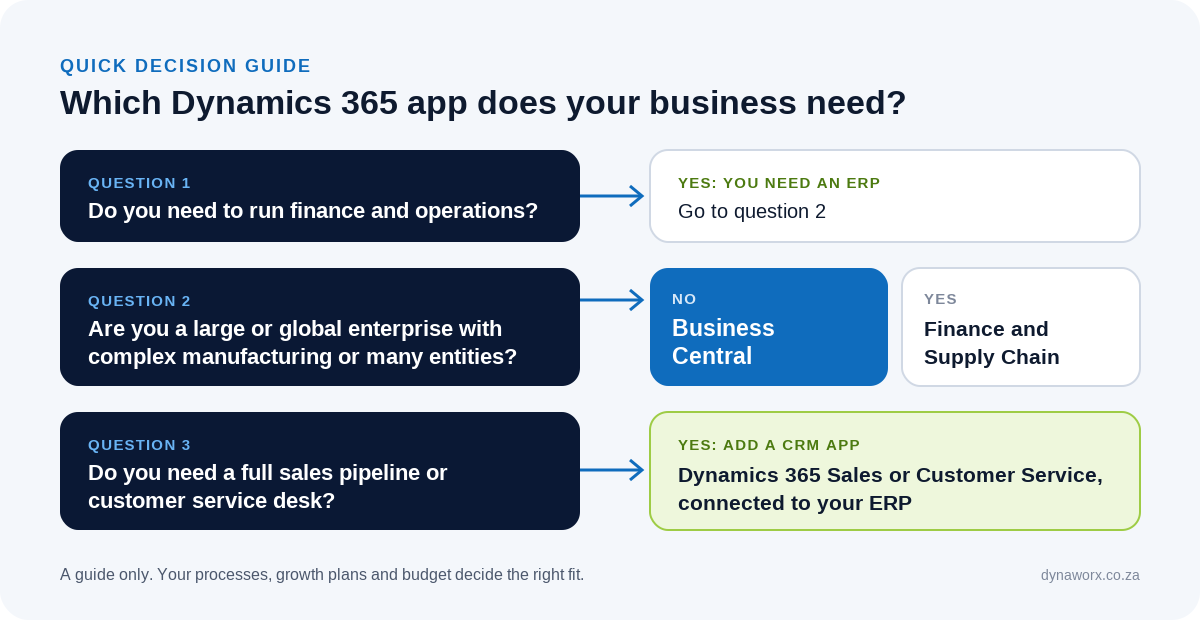
- Choose Business Central if you're a small or mid-sized business that has outgrown basic accounting software and wants finance, stock, purchasing, projects and reporting in one system.
- Consider Finance and Supply Chain Management if you're a large or international group with advanced manufacturing, complex planning or many legal entities across countries.
- Add Dynamics 365 Sales or Customer Service if your sales team needs a full pipeline or you run a busy service desk, and connect it to your ERP.
Can you start with Business Central and move up later?
Yes, and many businesses run on Business Central for years as they grow. But moving from Business Central to Finance and Supply Chain Management is a new implementation, not an upgrade, because they're different products. So choose based on where you expect to be in five years, not only where you are today. The good news is that skills in Microsoft 365, Power BI and the Power Platform carry over whichever way you go.
What South African businesses should check
- VAT and reporting: make sure South African VAT, reporting and banking formats are set up correctly from day one.
- Payroll: decide how payroll will connect. See our HR and payroll options.
- Local partner: look for a partner who invoices in rand and supports you during South African business hours.
- Your current system: moving from Sage Pastel or Dynamics GP? Read our guides on moving from Sage Pastel and migrating from Dynamics GP.
Frequently asked questions
Is Business Central part of Dynamics 365?
Yes. Its full name is Microsoft Dynamics 365 Business Central. It's the Dynamics 365 ERP app designed for small and mid-sized businesses.
Is Business Central the same as Dynamics NAV?
Business Central is the successor to Dynamics NAV (Navision). Much of the logic will feel familiar, but it runs in the cloud with a modern interface and automatic updates. See our NAV to Business Central upgrade guide.
Do I need Dynamics 365 Sales if I have Business Central?
Not necessarily. Business Central covers contacts, quotes and sales orders. Add Dynamics 365 Sales when your team needs lead management, pipeline tracking and forecasting.
What is the difference between Dynamics 365 Finance and Business Central?
Both are Microsoft ERPs. Business Central suits small and mid-sized businesses and is faster to implement. Dynamics 365 Finance suits large enterprises that need global consolidation and complex financial structures.
Can Business Central handle manufacturing?
Yes. The Premium licence adds manufacturing, including production orders, routings and capacity planning. Businesses that need advanced shop-floor control usually look at Supply Chain Management.
Sources
- Introducing Microsoft Dynamics 365 Business Central, Microsoft Learn
- About Copilot in Business Central, Microsoft Learn
- Integrating with Dynamics 365 Sales, Microsoft Learn
- Use Dynamics 365 Sales from Business Central, Microsoft Learn
- Dynamics 365 F&O and Business Central synergies, KPMG
- Which is the right version of Microsoft Dynamics 365 ERP for you?, Sikich
- Business Central or Finance and Supply Chain Management, Sikich


